Node - Hades
Storage / NAS / Core Service node built on a HPE MicroServer Gen10 Plus







For the full cluster architecture, see the Home Server Infrastructure Overview.
At a Glance
| Item | Value |
|---|---|
| Role | Storage / NAS / Core Service / VPN gateway |
| Hardware | HPE MicroServer Gen10 Plus, Intel Xeon E-2224G (4 cores), 32 GB RAM |
| Storage | Local VM disk (NVMe 1 TB) + 4 TB Main (NAS data, usable) + 6 TB Backup |
| Filesystem | ext4 |
| OS / Hypervisor | VMware ESXi |
| Network (IP) range | 192.168.100.X |
| Public ports | WireGuard (1) + NAS service (1) |
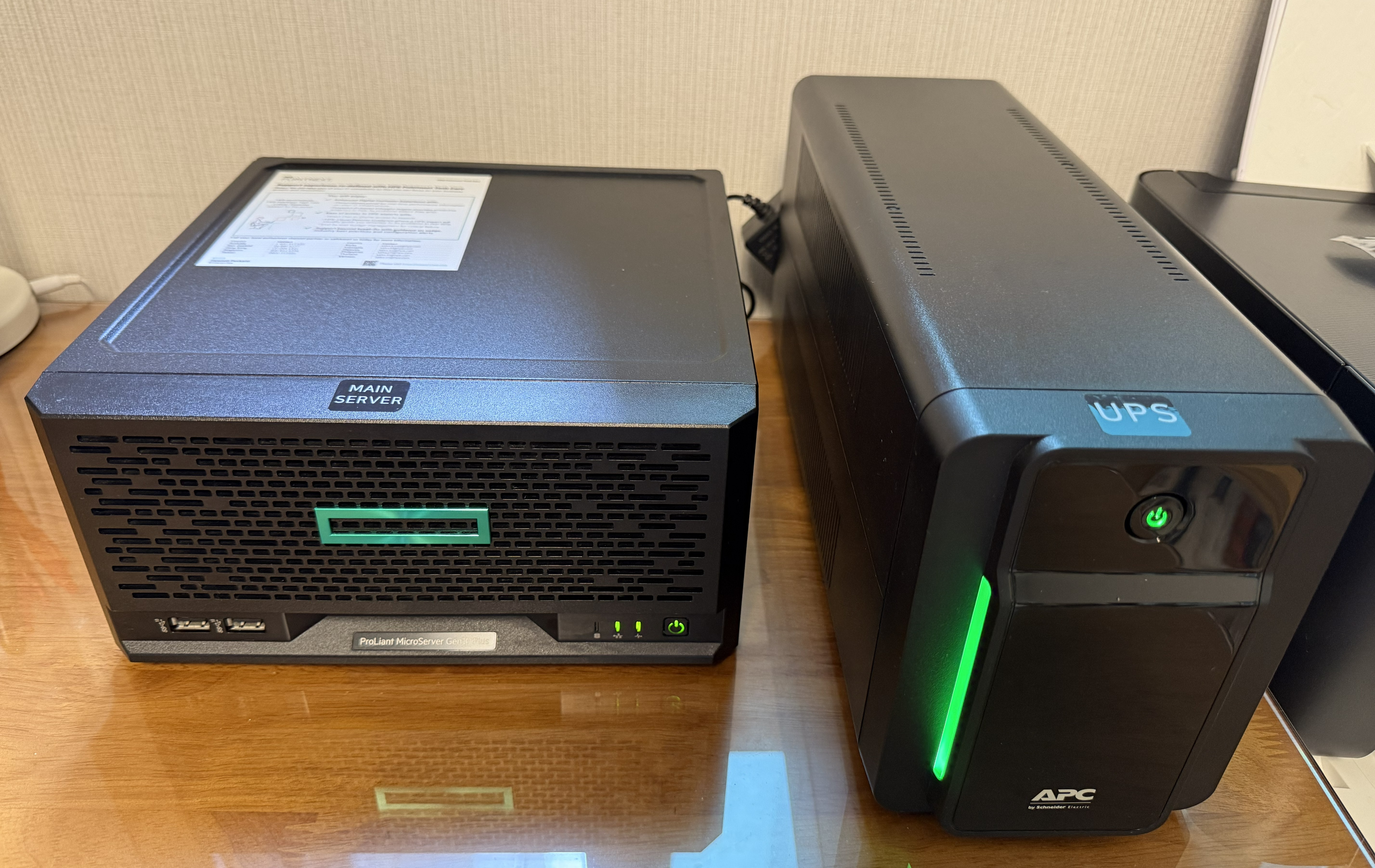
| Power protection | APC UPS BX950MI-GR (950 VA) — holds 10+ min at a 180 W peak; the NAS VM detects and propagates power loss |
| In service since | 2023 (2nd-generation node in the lab) |
| Current status | Running (storage hub) |
One-line summary: Hades is the always-on node where the cluster’s data, VPN, and core services converge.
What Runs Here
Hosted VMs
| VM | Role | Resources |
|---|---|---|
| OpenMediaVault VM | NAS main. SMB/NFS shares, user/permission management, rsync backup jobs, UPS USB endpoint | vCPU 2, RAM 4 GB |
| WireGuard VM | External → home-lab entry point. Receives management traffic and distributes it over the internal VPN | vCPU 1, RAM 2 GB |
| Core Service VM | Internal services that must always be up (collaboration tools, etc.) | vCPU 3, RAM 12 GB |
| CouchDB | Self-hosted Obsidian sync service | vCPU 2, RAM 2 GB |
Disk layout
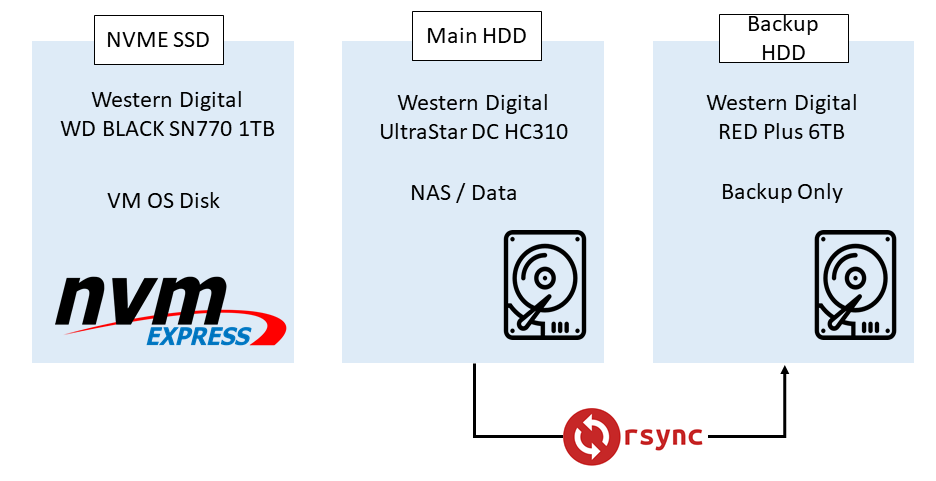
NAS share policy
- Long-term retention — project outputs, photos/documents, parts of training data → included in daily backup
- Regenerable data — container caches, temporary experiment outputs → excluded from backup
- Configuration assets — Docker Compose, service config files → synced to a separate Git repository
Service configs and Compose files live in Git rather than on the NAS, because if the NAS itself dies, service recovery would otherwise be impossible.
Key Decisions
- Why VMware ESXi
Hades is a 4-core machine, which fits inside the vCPU limit of the free ESXi license. On top of that, HPE provides an official ESXi image for the MicroServer Gen10 Plus, so firmware/driver compatibility was easy to settle. ESXi satisfied stability, compatibility, and a zero license cost at once, so it was the natural choice.
- Trade-off: the free ESXi license restricts API use and automation, so it is less IaC-friendly. Hades is a low-touch, always-on node, so this downside was acceptable.
- Why ext4 (instead of ZFS / btrfs)
At build time, reusing the ext4 disks from the previous system was the fastest path. The previous system held about 1.5 TB of data and there was no spare drive to back it up, so a zero-cost migration took priority.
- Given up: ZFS-style integrity protection such as snapshots, checksums, and scrub
- Mitigation: keep a separate backup copy via daily rsync, and back critical data up once more to an external cloud store
- Next step: ZFS adoption is under review for the next disk-replacement cycle. The current ext4 layout is operated with an explicit acknowledgement that it has no data-integrity protection (checksums).
- Why NAS and Core Service share one node
Separating them is safer in principle, but both share the always-on requirement and both are lightweight, so VM-level isolation on a single node was judged sufficient. Resource limits and disks are split so that the Core Service VM failing does not affect the NAS VM.
Operations & Incidents
Routine operations
- Run the daily
rsyncbackup job (Main → Backup) and check the result log - Take ESXi snapshots per VM, manually, before and after major changes
- Public ports = WireGuard (1) + the minimum NAS service port
- The NAS VM monitors UPS (APC BX950MI-GR) status and, on power loss, propagates the alert to the other nodes (Athena / Daedalus)
Power protection (UPS)
- Device: APC UPS BX950MI-GR, 950 VA output
- Load basis: HPE MicroServer Gen10 Plus peak draw of 180 W
- Protection window: configured to hold 10+ minutes at 180 W → enough time to shut down the NAS / Core Service VMs safely on power loss
- Detection & propagation: the UPS is attached directly to the NAS (OpenMediaVault) VM via ESXi USB passthrough. The NAS VM reads UPS state (external power cut / battery level); when an outage is detected it propagates the signal to Athena, Daedalus, and the rest → the cluster enters a coordinated safe-shutdown
- Why it was adopted: after the Athena incident (regional outage → forced shutdown → NVIDIA kernel-module corruption), I judged that Hades was exposed to the same risk and added a UPS. Details in Athena · Operations & Incidents.
Observability — automated email alerts
Reading logs by hand (as in the Fail2ban incident) meant opening them every time. So I picked a few events that are dangerous to miss and set them to email me automatically when they fire.
| Event | Trigger | Information in the message |
|---|---|---|
| Admin login | Successful login to the OpenMediaVault web admin account | time · source IP · username |
| UPS anomaly | UPS state change — entering battery mode / battery threshold / power restored | event type · battery level · estimated runtime |
| Backup result | Daily rsync backup job finishes (both success and failure) | exit code · files transferred · duration · error line on failure |
- Delivery path: the NAS VM (OpenMediaVault) is the single sender for all alerts, sent through an external SMTP relay (an app password on a personal mail account).
- Design principle 1 — send success too: backup alerts mail on success as well as failure. If only failures were reported, “no mail” could not be distinguished between a success and the job never running.
- Design principle 2 — avoid alert fatigue: UPS events fire only on state change; no periodic polling alerts.
- Next step: if SMTP dies, the alerts vanish with it, so I plan to add a secondary channel (Webhook / Telegram bot) to make the alert path redundant.
Operational metrics (measured snapshot, 2026-06)
I keep no separate time-series logging, but the values the kernel and drive firmware record on their own are enough to confirm current health. The below is a point-in-time snapshot.
| Item | Value |
|---|---|
| Continuous uptime | 255 days (uninterrupted since the last internal dust cleaning) |
| Main disk (HGST Ultrastar 4 TB) | 45,496 power-on hours (~5.2 years) · reallocated/pending/offline bad sectors 0 · UDMA CRC errors 0 · SMART error log empty · temp 41 °C (lifetime max 50 °C) |
| Backup disk (WD Red 6 TB) | 29,804 power-on hours (~3.4 years) · reallocated/pending sectors 0 · CRC errors 0 · ATA ABRT 1 (not a media error) · temp 38 °C |
| Disk usage | Main 2.31 TiB / 3.10 TiB · Backup 2.30 TiB · OS 10.8 GiB |
| SMART overall | both disks PASSED |
- Both disks show zero reallocated/pending/offline bad sectors and no interface (CRC) errors, so even the Main disk — past 5 years of runtime — is still physically healthy.
- The Backup disk is a WD Red SMR model (WD60EFAX). SMR has a known issue where large sequential writes and rebuilds drop sharply in performance. It is backup-only (read/append heavy), so it is not a problem today, but I run it knowing it is unsuitable as a RAID-rebuild target.
- These are a single point-in-time snapshot; observing trends (growth rate, temperature drift) needs separate collection → tied to the monitoring item in Next Steps.
Incident — external login attempts → Fail2ban
Situation: when I first opened some NAS services externally, Fail2ban was not enabled.
How I noticed: opening the auth log on a whim during operation, I found login attempts from various external IPs piling up by the minute, using common account names like root, admin, user, test.
Response:
- Blocked root login — disabled direct root login for both SSH and the NAS admin account.
- Applied Fail2ban — policy on public NAS services: 5 password failures within 24 h → 24 h ban.
- Re-audited the public surface — closed non-essential service ports and moved access behind VPN.
Lesson: exposing a service externally and operating a service are separate tasks. Until you actually read the logs, it is easy to mistake “it works” for “there is no intrusion.”
Limitations & Next Steps
What’s missing now
- Backups live in the same physical location (no off-site backup) → vulnerable to single events like fire/theft
- ext4 has no data-integrity protection (checksums)
- The alert path is a single SMTP line — if SMTP dies, the alerts die too (single point of failure)
- Recovery tests are not run regularly — a “backup-success mail” does not guarantee restorability
- SMART/uptime metrics are checked manually only — long-term trends (rising bad sectors, temperature) are not tracked automatically
- The free ESXi license limits automation/IaC (the Broadcom-acquisition end-of-life situation needs monitoring)
What I’ll change next
- Add a backup of just the critical data to one external cloud store (or another location) to satisfy 3-2-1
- Wire SMART values into periodic collection and threshold alerts to catch bad-sector/temperature trends before failure
- Add a secondary alert channel (Webhook / Telegram bot) to remove the SMTP single point of failure
- Migrate the NAS filesystem to ZFS / btrfs at the next disk-replacement cycle (and swap the SMR backup disk for CMR)
- Register recovery tests as a recurring task (quarterly target) — measure restore success, not just backup success
Photo
Korean version: Node - Hades